Every brand   Updated July 19, 2026 · 2 min read

How to Type on Fire TV and Android TV From Your iPhone

Quick answer Pair a remote app like A Decent Remote (a one-time on-screen code on Android TV, one approval on Fire TV) and its keyboard button turns the iPhone keyboard into the TV keyboard: searches, sign-ins and Wi-Fi passwords type instantly, character by character, with backspace and paste included.
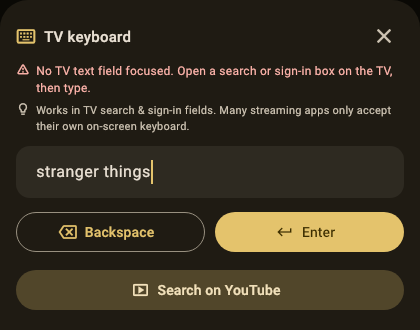
The TV keyboard sheet in A Decent Remote typing "stranger things" into a TV search field, with Backspace, Enter and Search on YouTube buttons

The on-screen keyboard is where TV interfaces go to feel like 2005: a nine-row letter grid, a d-pad, and a password with mixed case and symbols. Both Fire TV and Android/Google TV accept real keyboard input over the network; they just never shipped a keyboard to use it with. Your iPhone is that keyboard.

How do I set it up?

Once per device, no original remote required:

  • Android TV / Google TV: open A Decent Remote, tap the TV, type the 6-digit code it shows on screen (full steps).
  • Fire TV: tap the device and accept the one-time “Allow USB debugging” prompt, with the TV remote via HDMI-CEC if the Alexa remote is gone (full steps).

After that, the app’s keyboard button opens the iOS keyboard, and everything you type lands on the TV character by character: letters, numbers, symbols, backspace, and paste.

Where does it shine, and where are the honest limits?

Shines: global search, app-store search, Wi-Fi passwords, and above all sign-ins, where paste from a password manager turns the worst TV chore into two seconds. Dictation works too, since it’s the real iOS keyboard.

Limits: platforms only expose their standard text fields. A streaming app that draws its own custom letter grid (a few insist) ignores every external keyboard, including Google’s own remote app; there you’re navigating the grid, just faster from the phone. And YouTube search specifically has a better route than typing into a grid at all: opening the results page directly on the TV, covered in the YouTube search guide.

Which other TVs can the same phone type on?

Roku takes keyboard input with no pairing whatsoever (guide), Apple TV types over its remote protocol regardless of Apple ID (guide), and Samsung and LG accept typing into their TV-level search fields after the one-time pairing. One keyboard habit, every screen in the house: that’s the actual pitch.


A Decent Remote app icon Get A Decent Remote on the App Store One iPhone remote for Roku, Samsung, LG, Sony, Fire TV, Apple TV, Vizio, Hisense, Philips, Panasonic, Toshiba, Chromecast and Android/Google TV

Related guides

How to Search YouTube on Your TV From Your iPhone

Skip the letter grid. Two ways to search YouTube on the big screen using your iPhone keyboard, including one that works across six TV platforms.

A TV Remote You Can Rearrange: Custom Layouts on iPhone

Physical remotes decide for you: forty buttons, six you use. How a customizable remote layout works, and why moving the touchpad matters more than it sounds.

YouTube Search on Your TV From an iPhone: Photo Walkthrough

Every screen from the App Store to YouTube results on the TV, photographed on a real LG. About five minutes end to end, no TV remote involved.

Frequently asked questions

Does typing work in every app on the TV?

It works wherever the platform shows a standard text field: global search, store search, account sign-ins, network passwords. Streaming apps that draw their own custom letter grids (some do) ignore external keyboards; there the phone's navigation keys still drive the grid faster than the remote.

Can I paste passwords from a password manager?

Yes, and it's the biggest single win: autofill or copy on the iPhone, paste into the remote app's input, and the whole string types into the TV field at once. A 16-character streaming password stops being a two-minute grid ordeal.

What's needed before typing works?

Just the normal pairing: Android TV / Google TV shows a 6-digit code you type on the phone; Fire TV shows an approval prompt you accept once. Both flows work without the original remote.

Is this the same as the Google TV app's remote keyboard?

Google's app offers typing on Android TV only. A universal remote app covers Fire TV with the same keyboard, plus Roku, Apple TV, Samsung and LG fields, so one habit works on every screen in the house.