Every brand   Updated July 19, 2026 · 2 min read

How to Search YouTube on Your TV From Your iPhone

Quick answer Two good ways: the YouTube app on your iPhone can cast a video to the TV once both share Wi-Fi. Or type the search in A Decent Remote and it opens the results page in the TV's own YouTube app, so you browse on the big screen. That works on LG, Samsung, Fire TV, Android/Google TV, Roku and Philips.
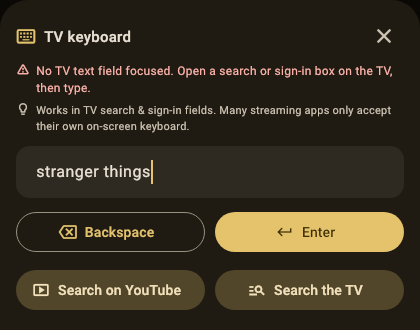
The TV keyboard in A Decent Remote with "stranger things" typed and two buttons: Search on YouTube and Search the TV

Typing “relaxing jazz playlist” one arrow-press at a time is how YouTube on a TV punishes you for not finding the remote’s voice button, or for owning a TV without one. Your iPhone already has the good keyboard; here’s how to point it at the big screen.

How does searching from the phone actually work?

There are two mechanically different routes, and they suit different moments.

Casting from the YouTube app (Google’s built-in way): open YouTube on the iPhone, search there, tap the cast icon on a video, and it plays on the TV. This works on cast-capable TVs when both devices share Wi-Fi. The limitation: browsing happens on the phone, so the couch watches a loading spinner while one person scrolls privately.

Opening the search on the TV (the remote-app way): type the phrase into A Decent Remote and it launches the TV’s own YouTube app straight into the results page. The big screen shows the results grid, navigation continues with the remote or the phone, and everyone sees the options. One keyboard, zero letter-grid.

Why is this harder than it sounds (and why most apps don’t do it)?

TV platforms generally refuse outside text input inside streaming apps: YouTube’s search field on a webOS or Fire TV only accepts its own on-screen keyboard. The workaround is to relaunch YouTube with the search phrase passed as a launch parameter, which every platform allows because it’s the same mechanism the TV’s own voice search uses. A Decent Remote implements that hand-off per platform: LG, Samsung, Fire TV, Android/Google TV, Roku and Philips all take the phrase and open results directly. One visible quirk worth knowing: on LG the screen blinks black for a beat while webOS relaunches the app; that’s the platform, and the results follow immediately.

What about typing everywhere else on the TV?

Search fields outside streaming apps (the TV’s global search, logins, Wi-Fi passwords) take direct keyboard input on most platforms, which the same app provides: details per platform in the Roku typing guide, the Fire TV and Android TV typing guide, and the Apple TV keyboard guide.


A Decent Remote app icon Get A Decent Remote on the App Store One iPhone remote for Roku, Samsung, LG, Sony, Fire TV, Apple TV, Vizio, Hisense, Philips, Panasonic, Toshiba, Chromecast and Android/Google TV

Related guides

How to Type on Fire TV and Android TV From Your iPhone

Passwords and searches without the letter grid: how iPhone keyboard input works on Fire TV and Android/Google TV, what it covers, and where the limits are.

A TV Remote You Can Rearrange: Custom Layouts on iPhone

Physical remotes decide for you: forty buttons, six you use. How a customizable remote layout works, and why moving the touchpad matters more than it sounds.

YouTube Search on Your TV From an iPhone: Photo Walkthrough

Every screen from the App Store to YouTube results on the TV, photographed on a real LG. About five minutes end to end, no TV remote involved.

Frequently asked questions

What's the difference between casting and opening search on the TV?

Casting sends one chosen video from your phone to the screen; browsing stays on the phone. Opening the search on the TV puts the full results page in the TV's YouTube app, so everyone on the couch scrolls and picks together, with the phone only used for typing.

Why can't I just type into the TV's YouTube app from a remote app?

Most TV platforms block direct text input inside third-party streaming apps; the app's own letter grid is the only field they expose. Launching YouTube with the search phrase as a parameter side-steps that restriction, which is how the results end up on screen.

Which TVs support opening YouTube search results this way?

LG (webOS), Samsung (Tizen), Fire TV, Android TV / Google TV, Roku, and Philips. On other platforms the app still launches YouTube; the phrase hand-off is the part that needs platform support.

Why does my LG TV flash black for a moment when the results open?

webOS relaunches the YouTube app to hand it the search phrase, and the relaunch blinks. It's a platform quirk, not a crash, and the results load normally right after.